
Affiliate Marketing Revenue Tracker Template
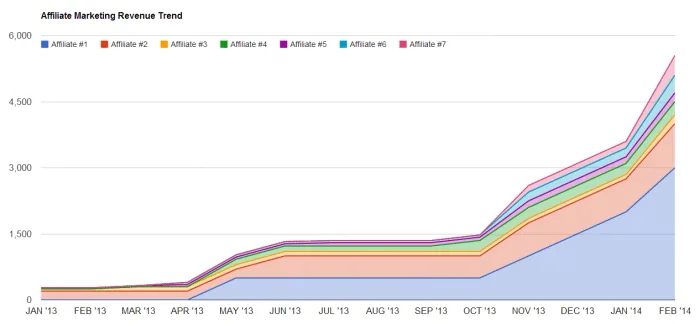
I’m not aware of any fully automated affiliate marketing revenue tracking software. I would love if I could just login to one dashboard and see all of my affiliate revenue, all entirely up-to-date. Unfortunately there are just so many different affiliate programs, with wildly different interfaces and reporting mechanisms that it’s just not very practical for such a product to exist. This is why I have created this affiliate marketing revenue tracker template for Google spreadsheets. You may have to manually update it, but once you do it’s pretty useful.
Something I tend to do constantly is project my earnings for the month. In fact I did it so frequently that I decided I had had enough. So I created this lovely Google spreadsheet formula to automate that for me, based on the current day in the month relative to the number of days in the current month. Now grab a free copy and enjoy it for yourself!
Frequently Asked Questions
What is the affiliate marketing revenue tracker template?
It's a free Google Sheets template for manually tracking affiliate marketing revenue from different affiliate programs in one place.
Does it automatically pull in revenue from affiliate networks?
No. There isn't a reliable way to automatically aggregate revenue across different affiliate programs, since each one has its own interface and reporting format, so the template is updated manually.
How does the earnings projection formula work?
It projects your monthly earnings by comparing the current day of the month to the total number of days in that month, then scaling your revenue so far accordingly.
Is the template free to use?
Yes. It's a public Google Sheets template you can view and copy for free.
3 Comments
I can only view it.
Of course! Sorry I didn't explain this. Simply open the Google spreadsheet and go to File > Make a copy in order to save your own copy of the template.