
7 Common Google Analytics UTM URL Tracking Mistakes To Avoid
Editor’s note (June 2026): Universal Analytics was shut down by Google in July 2023. The concepts here still apply, but the tracking code, reports, and segment templates must be recreated in Google Analytics 4.
What is a UTM, A.K.A. a Campaign URL?
UTM parameters are tracking markers that you can add to a URL pointed at your website to track where visitors come from in granular detail in Google Analytics. UTM stands for Urchin Tracking Module. Urchin was the original name of the analytics software acquired by Google that was ultimately integrated into Google Analytics. UTMs are particularly helpful for tracking visitors from social media posts, emails, PDFs, etc. For more information on what UTMs are and how they’re used in social media check out Buffer’s excellent UTM Guide. For more information and examples for each UTM parameter check out Google’s Campaign URL Builder.
As long as the website you are linking to with UTM parameters has Google Analytics tracking code installed on it, it will record the UTM parameters when a visitor visits the website using the URL with UTM parameters included in the link they use to access the website. The only required parameter is the campaign source (utm_source), the rest of the UTM parameters are optional, although in almost all cases I would recommend using all of them except the campaign term (utm_term) parameter.
Common UTM Mistakes To Avoid
If you’re running into problems tracking UTMs, hopefully this list of common UTM mistakes will help you find a solution. If your problem isn’t addressed by any of these common UTM mistakes, feel free to share what you’re struggling with in the comments and I’ll do my best to try and help you out.
-
Multiple entries for the same link due to UTM inconsistencies
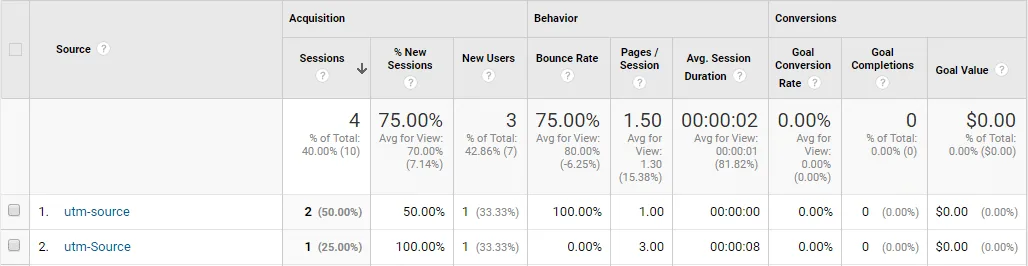
To avoid this mistake use the KUSS principle “Keep UTMs simple, stupid”. I keep my UTMs simple by sticking exclusively to lowercase characters, numbers, hyphens for spaces and not using any other special characters.When you don’t use the KUSS principle you end up with duplicates of the same UTM source, which results in this:
-
UTMs getting stripped from URL by redirects before hitting your site
If you link to a URL that isn’t on the website you want to track, that then redirects to the site you do want to track without the UTMs they will not be recorded in Google Analytics, since the redirect has stripped the UTMs. In this scenario Google Analytics on the target site never loads a URL containing the parameters so nothing is recorded. Instead it would record the visit as a referral from the website containing the redirect with no additional tracking information.
Alternatively, if you link to a shortened URL that then redirects to the target website with the UTM parameters added to the end of the target website URL - as is the standard practice - then Google Analytics will see the URL containing the UTM parameters and record the additional tracking information as intended.
It is possible to track UTMs through one website and track the associated activity on another, but this requires a more complex setup with cross-domain tracking. If you’re interested in doing so and have access to both websites you can make this work following Simo’s guide to Troubleshooting Cross-Domain Tracking In Google Analytics utilizing Google Tag Manager, which makes it relatively easy if you know what you’re doing.
-
Adding UTMs incorrectly to URLs with existing query strings
If you’re at all unsure about the formatting of your UTM-enabled URL, just use Google’s Campaign URL Builder to make sure there’s nothing wrong with your URL’s formatting - it only takes a minute and will give you peace of mind.
For example if you were linking to this URL with an existing query string:
https://penguiin.com/?s=queryIf you tried to add a UTM like this it wouldn’t work properly:
https://penguiin.com/?s=query?utm_source=newsletter&utm_campaign=spring-sale&utm_medium=email&utm_content=early-bird-discountTo get the UTM to work properly you would need to adjust the UTM to start with an ampersand instead of a question mark as follows:
https://penguiin.com/?s=query&utm_source=newsletter&utm_campaign=spring-sale&utm_medium=email&utm_content=early-bird-discountIf you created the UTM using Google’s Campaign URL Builder it would automatically fix the URL for you to the correctly functioning version above.
-
Not using a URL shortener
Not shortening your URLs to mask UTMs is bush league. At the very least use Google’s URL shortener built into their Campaign URL Builder. If you want to go pro purchase a branded URL shortener domain and setup bitly to work with it. I’ve found Domainr to be a very helpful tool for identifying great branded URL shortener domains.
Rather than sloppily expose your full UTM URL like this:
https://penguiin.com/?utm_source=newsletter&utm_campaign=spring-sale&utm_medium=email&utm_content=early-bird-discountWhy not have something more elegant like this instead:
http://pngn.link/early-penguin
-
Using UTMs to track internal links
UTMs should never be used to track internal links on your site. Doing so can ruin your raw Google Analytics data as Neil Patel explains in his blog post on the 8 Common SEO Issues (and How to Troubleshoot Them).
-
Filling in the term UTM with non-keywords
The term UTM should only be used for paid search to note the keyword being targeted. When using Google Ads you simply need to link your Google Ads and Analytics accounts and use the auto-tagging feature. So in the vast majority of cases the term UTM should not ever be used and you should leave it blank when using Google’s Campaign URL Builder, because you don’t want non-keywords showing up as “keywords” misleading you in your keyword reports.
-
Expecting exact capitalization to matter in advanced segments using exactly matching conditions
When you create an advanced segment with the condition Source that exactly matches a source in all lowercase as follows:
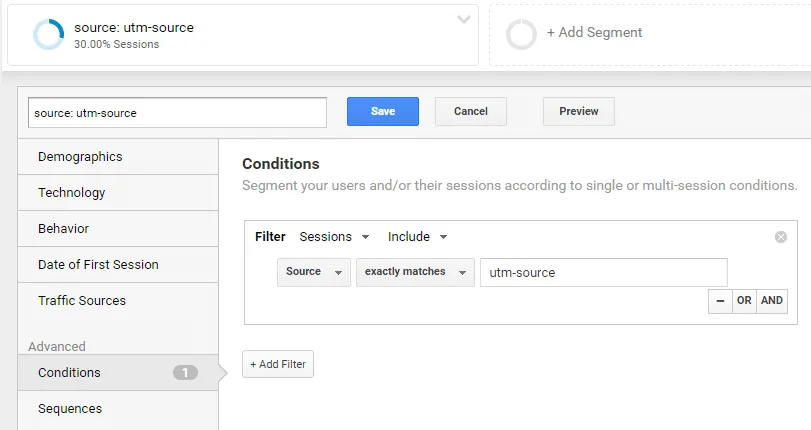
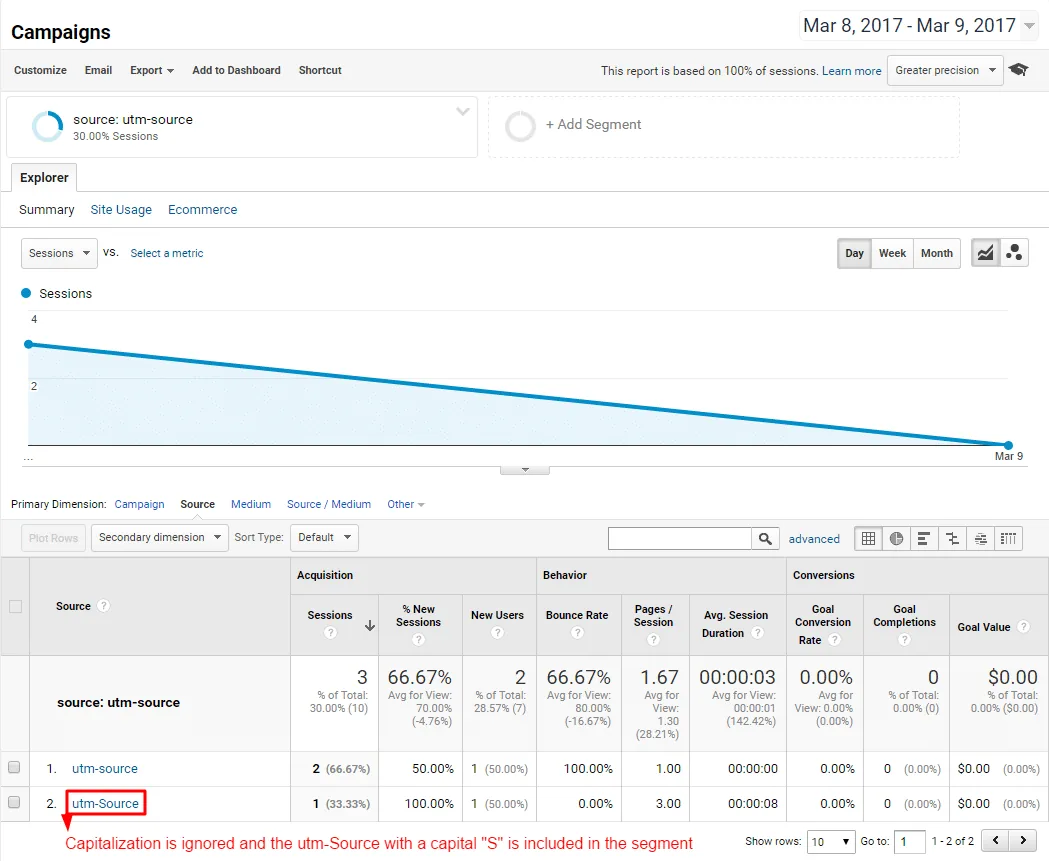
The advanced segment ignores capitalization and includes campaign sources with and without capital letters as follows:
Other Common UTM Mistakes To Avoid?
If you have additional common UTM mistakes to avoid, please share them in the comments!
Related Articles

Frequently Asked Questions
What does UTM stand for?
UTM stands for Urchin Tracking Module, named after Urchin, the original analytics software that Google acquired and folded into Google Analytics.
Which UTM parameter is actually required?
Only utm_source is required. The rest are optional, though using all of them except utm_term is recommended for clearer reporting.
Why do my UTM links show up as separate sources in Google Analytics?
Inconsistent capitalization is the most common cause. Using different capitalization for the same source creates duplicate entries, so it's best to keep UTMs lowercase with hyphens instead of spaces.
Do these UTM tips still apply now that Universal Analytics is gone?
Yes. Universal Analytics was shut down in July 2023, but the underlying UTM concepts still apply in Google Analytics 4, even though the reports and segment setup look different.
55 Comments
Thanks - I look forward to your response
"If a prospect's first touch point is a link with a UTM parameter and the link drives the prospect to a page with Pardot tracking code then Pardot will also be able to capture the UTM parameter and record it in a special Google Analytics table on the prospect's record."
http://help.pardot.com/customer/portal/articles/2133719-using-lead-source-or-pardot-campaign----when-to-use-which-#lead-source
So it should be capturing in that "special Google Analytics table on the prospect's record."
What is the UTM-enabled URL that's not populating?
https://megalytic.com/blog/dangers-of-shortened-urls-for-analytics
Your article is great, but I still don't know what the problem might be in my case. Here is a link that doesn't get tracked in GA. Would you pls take a look and advise? I'd really appreciate it.
https://www.peerform.com/common/redirectregistration.aspx?utm_source=SFSOptionTest&utm_medium=email&utm_campaign=2018Test&utm_content=*|HTML:MERGE3|*&fname=*|HTML:MERGE1|*&lname=*|HTML:MERGE2|*&email=*|HTML:MERGE0|*&home=*|HTML:MERGE4|*&zip=*|HTML:MERGE5|*&loanamount=25000&loanpurpose=1
Thank you,
Oana
It looks like the URL is being redirected to a URL that has the UTM's stripped from it.
So to fix it you either need to:
1) Pass the UTM parameters through to the redirected URL.
OR
2) Ensure Google Analytics tracking code is loading on the URL where the redirect is initiated and has adequate time to execute / capture the UTM parameters before the URL is redirected.
Cheers,
Andy
The hash will not , on its own, break the UTMs
By default, GA will look at the URL fragment (after the hash # aka anchor) for UTM parameters.
Add the following to your URL:
#utm_source=test_source&utm_medium=test_medium&utm_campaign=test_campaign
and monitor the Traffic Sources report in Real Time ...
See:
https://developers.google.com/analytics/devguides/collection/analyticsjs/field-reference#allowAnchor
Our UTM is set up as such: landing page, UTM, then #anchor
The below UTM parameters (setup before a month) in individual newsletters aren't reporting under Acquisition->Campaigns. Can you check what is the issue? Thanks!
https://www.planadviser.com/study-suggests-women-likely-heed-financial-advice/?utm_source=newsletter&utm_medium=email&utm_campaign=PAdash
https://www.plansponsor.com/exclusives/plan-sponsors-shouldnt-fear-making-settlor-decisions/?utm_source=newsletter&utm_medium=email&utm_campaign=blines
https://www.plansponsor.com/nearly-one-third-pensions-funding-status-95/?utm_source=newsletter&utm_medium=email&utm_campaign=Newsdash
great article still a ways from understanding it all but lots of great information.
my source is ok but it redirect to referral.
my url has #, is it important?
thanks
Finally, do you know of/recommend any programs that make it possible to edit short URLs once they are in use? For example, if we changed some pages on our website and xyz.com/topicA/topicB became xyz.com/topicA/topicZ is it possible to avoid breaking all of the short links we had created. Thanks in advance for your help!
Did you even encounter where a website keeps loading indefinitely because a link with utm information was used?
Even the mist simple utm-link to our homepage bugs our site: https://solid-gray.com/?utm_source=a&utm_medium=b
Would love to hear what you make of it.
Thanks!
But there are no results in the Campaigns section of Google Analytics. I waited the 24 hours they say it may take to display results in Google Analytics, but still nothing. Any idea what I may be doing wrong? Thank you so much!
I checked in SEM rush to do a site audit and came to know that my UTM url's are being treated differently (as in a different link) & showing an error. Is the google treating it differently too??
Great article, and I appreciate you answering all the questions in this thread.
Hoping you can help with one more. We had some mistakes that lead to poorly formed URLS that have multiple utm_source and utm_campaign params.
Do you have any idea how that would track in GA? Would it be tagged as both? Tagged as the first utm_source it runs into, or the last maybe? Having no idea, is making it difficult to try and make sense of our corrupted records.
Thanks
When someone click on the link Google Analytics shows correct data with correct campaign name and when another person click on same link, google analytics detect it as a direct traffic..I am unable to track exact amount of clicks..
How can i resolve it? Any help is really appreciated.
I appreciate the article. Very concise and informative - though it leaves me with a single question. If I include something like "AdWords" or "ad300px" in a UTM tag to help me better track where on the page an acquisition is coming from, will AdBlocker or similar programs weed it out? Or do they simply work on the domain/subdomain and not focus on UTM tags?
Thanks!
I was owndeirng, if you enable autotagging for google anlytics google adwords, but you use manual tagging to have a good google analytics, organized system, how do you make it so that autotagging wont screwu p the look/organizaiton of your current utm system?
Ex.
BEST WAY TO ORGANIZE ALL YOUR UTM CODES- follow this:
Campaign+block1+block2+block3 (we’re leaving out source and medium because that is already present in GA)
Ex. Back-to-School Campaign - (Campaign Block 1)
WONT BE IN: Facebook Ads- (Source: Facebook, Medium: paid-social, these will show up already, so thats not important to our campaign tag we will leave these out since that data is already existing somewhere else)
Backpacks, Notebook, or Pens (ad Group) (Campaign Block 2)
10% Off, Free Ship, or Free gift- whatever the offer is. (Campaign Block 3)
Thx!
What are your thoughts?
We are having issue where our ad server (Google Ad Manager) is tracking 4 clicks but GA is saying 27 for the same period of time. We used a utm code and then ran it through bitly. Is there a reason as to why we are seeing such a vast difference between the ad server and GA?