
I Audited My Own GA4 Key Events and Un-Marked 2 of the 7
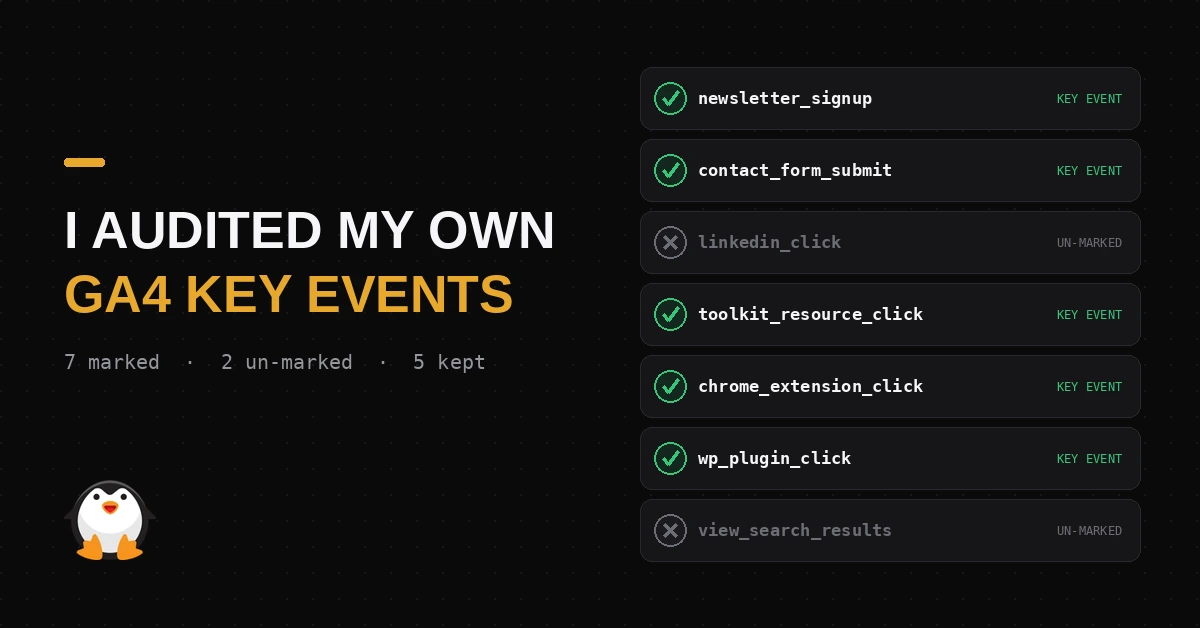
The short version: I marked 7 GA4 events as key events on this site. Two of them,
linkedin_clickandview_search_results, could never be more than Secondary conversions in Google Ads, so I un-marked both. Five real key events left, with room to add one later.
GA4 has more than 40 possible event types: 3 automatically collected events that fire no matter what (session_start, first_visit, user_engagement), roughly 10 enhanced measurement events you can toggle on with zero code (page views, scroll, outbound clicks, site search, video engagement, form starts and submits, file downloads), 35+ recommended events with predefined names for things like sign-ups and e-commerce, and unlimited custom events you define yourself.
I’ve marked 7 of those as key events, GA4’s current name for conversions, on andyforsberg.com:
| Key event | What fires | Filtered on |
|---|---|---|
newsletter_signup | form_submit | form_id = newsletter-form |
contact_form_submit | form_submit | form_id = contact-form |
linkedin_click | outbound click | URL contains linkedin.com |
toolkit_resource_click | click | link_classes contains tk-card |
chrome_extension_click | outbound click | URL is the Chrome Web Store, for my extension WPSNIFFER |
wp_plugin_click | outbound click | URL is wordpress.org/plugins, for my plugin Sexy Author Bio |
view_search_results | built-in on-site search event | none, used as-is |
Six of those seven are enhanced measurement events (form_submit, click) narrowed down with a filter, not true custom or recommended events. That’s a normal way to build key events, but the underlying event still fires for every form and every click on the site. My key event is a slice of that.
If I ever change a form’s ID, a link’s URL, or the
tk-cardclass, the conversion breaks silently. No error, no warning. The number quietly drops in the reports, and fortoolkit_resource_click, it drops for all 204 tools at once, not one at a time.
GA4 also has recommended events built for exactly two of my use cases: sign_up for the newsletter form and generate_lead for the contact form. Using those instead of a filtered form_submit would survive a URL or form-ID change, since the event fires on its own name, not on a value that can drift.
Why this decision matters
A key event decides two things: what GA4’s reports treat as “success,” and, if I ever run Google Ads or paid social, what the algorithm optimizes my spend toward.
Mark the wrong action as a conversion, and you train a bidding algorithm to chase it.
GA4 caps you at 30 key events per property, but the cap isn’t the target. Best practice:
- Log the event first.
- Confirm it fires correctly in DebugView.
- Only then mark it as key.
Never mark speculatively. Keep the list short enough that “conversions” still means something. Most small sites do best with 3 to 7 business-critical key events, not 20-plus diluted ones.
Grading my own 7
Mine split into two tiers:
| Tier | Key events | Why |
|---|---|---|
| Strong | newsletter_signup, contact_form_submit, chrome_extension_click, wp_plugin_click, toolkit_resource_click | Each maps to real downstream value: a lead, a subscriber, product intent, or which of 204 tools someone cared enough to click |
| Soft | linkedin_click, view_search_results | Shows curiosity, not commitment |
toolkit_resource_click used to be toolkit_page_view, which only proved someone landed on the page, not that they used it. Switching the trigger to clicks on the tk-card class, shared by all 204 tool cards on my digital marketing toolkit, fixed that with one filter instead of 204 separate ones.
Primary vs. secondary, if I ever run paid
When you import GA4 key events into Google Ads, each one gets marked Primary or Secondary:
| Drives Smart Bidding | Shows in reports | |
|---|---|---|
| Primary | Yes, the algorithm spends to get more of these | Yes |
| Secondary | No influence on bidding | Yes, for analysis only |
If I ran a campaign today and left all 7 imported as Primary by default, I’d be telling Google’s algorithm that a LinkedIn click and a search-results view are worth exactly as much as a newsletter signup or a plugin install. That’s a fast way to burn budget optimizing for the wrong signal, on top of the campaign URL mistakes that can already muddy where that budget is coming from.
Sorting them that way raised a better question: if linkedin_click and view_search_results can never be more than Secondary, should they be key events at all?
Marking an event as a key event doesn’t change whether GA4 collects it or whether I can analyze it. Both still show up in Explore, funnels, and segments either way. What key event status controls is narrower: whether the event lands in the Key Events report, and whether it’s eligible to import into Google Ads as a conversion action. Neither linkedin_click nor view_search_results earns that. So I un-marked both.
GA4 still records every click and every search. I stopped treating curiosity as a conversion.
That leaves 5 real key events: newsletter_signup, contact_form_submit, chrome_extension_click, wp_plugin_click, and toolkit_resource_click. All 5 as Primary if I ever run paid, no Secondary tier needed, because nothing weak enough to require one is still marked. Five also sits inside the 3-to-7 range from earlier, with room to add a real one later.
Next: switching the newsletter and contact forms to fire sign_up and generate_lead directly, so they survive a form-ID change the same way toolkit_resource_click now survives everything except a tk-card rename.
Related Articles
Frequently Asked Questions
What is a GA4 key event?
A key event is GA4's current name for a conversion. Marking an event as a key event doesn't change whether GA4 collects or reports on it. It only controls whether it shows up in the Key Events report and whether it's eligible to import into Google Ads as a conversion action.
What's the difference between Primary and Secondary conversions in Google Ads?
Primary conversions drive Smart Bidding, meaning Google's algorithm actively spends your budget to get more of them. Secondary conversions are visible in reports for analysis but have no influence on bidding decisions.
How many key events should a small site have?
Most small sites do best with 3 to 7 business-critical key events. GA4 caps you at 30, but the cap isn't a target. A shorter list where every key event maps to real downstream value is more useful than a long one padded with soft signals.
Does un-marking a key event delete the underlying data?
No. Un-marking an event as key only removes it from the Key Events report and from Google Ads import eligibility. GA4 still records every instance of the event, and it's still fully available in Explore, funnels, and segments.
What's the difference between a custom event and a recommended event in GA4?
A custom event is one you name and define yourself, like a filtered form_submit tied to a specific form ID. A recommended event, such as sign_up or generate_lead, uses a name and parameters Google predefines for a specific use case. Recommended events are more resilient because they fire on their own name rather than on a value, like a URL or form ID, that can drift over time.